Cute Ruffle Frame Canva Template
A Designer’s First Glance: Soft, Sweet, and Ready for Stitching
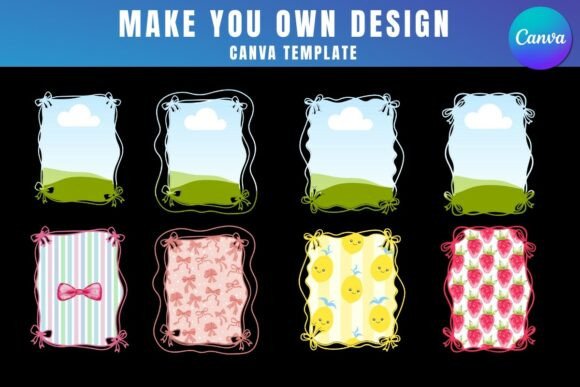
When I opened the Cute Ruffle Frame Canva Template, my immediate thought wasn’t “cute”—it was “considered.” The ruffle motif isn’t fussy or over-rendered; it’s balanced, with gentle curves and breathing room between elements. It feels like a frame you’d choose for a baby’s onesie or a boutique kitchen towel—not because it shouts, but because it invites warmth and care. As an embroidery designer who’s stitched hundreds of client projects, I know that mood translates directly to how a finished product lands with customers. This isn’t a bold graphic—it’s a delicate accent, designed to elevate, not dominate.
Where It Shines in Real Embroidery Projects
I tested the Cute Ruffle Frame Canva Template by building a mockup for a custom embroidered tote bag—linen blend, medium weight, light beige. I dropped a soft watercolor floral PNG into the frame via Canva, then translated that layout into a machine embroidery design workflow. The result? A cohesive, hand-finished look without needing advanced digitizing. It worked beautifully as a centered chest placement on a cotton sweatshirt, and even held up when scaled down for a baby bib. The frame’s open structure gives plenty of space for subtle fill stitch textures or delicate satin stitch ruffle edges—no overcrowding, no visual noise.
For Etsy sellers and small shop owners, this is a quiet win. Think personalized holiday tea towels, nursery wall hangings, or wedding favor pouches. The template supports consistent branding across product lines: same ruffle shape, different interior images (monogram, seasonal icon, tiny animal silhouette). That repeatability matters when you’re listing 20+ items and need visual harmony without redesigning from scratch.
Where to Pause—and Why
- Small hoop sizes: The full frame fits comfortably in a 5x7 hoop, but tight corners and inner ruffle loops may clip if scaled below 3.5 inches wide. Always test stitch a corner section first.
- Textured or stretchy fabric: On terry cloth towels or ribbed knit caps, the clean lines of the frame can blur. Use cutaway stabilizer + basting stitches to anchor the outline before filling.
- Dark or dense backgrounds: Since the template relies on contrast between frame and interior image, avoid dropping low-contrast JPGs onto dark fabric mockups. Test your final composition in grayscale—it reveals where detail disappears.
- Frequent-wash items: Baby onesies and kitchen towels demand durability. If you’re stitching the frame outline as satin stitch, confirm thread density allows flexibility—overly dense satin can crack after repeated laundering.
What It Adds to Your Handmade Product—and What It Doesn’t
The Cute Ruffle Frame Canva Template doesn’t replace skilled digitizing—but it does remove guesswork from layout, proportion, and negative space. That’s huge for crafters juggling design, production, and sales. When stitched cleanly, it elevates perceived value: customers see intention, not just decoration. A ruffle-framed monogram on a linen pillow cover reads “curated,” not “canned.” That builds trust—especially for personalized gifts where emotional resonance matters more than flash.
It won’t carry heavy branding on its own (no logo lockup, no slogan space), nor does it suit high-contrast streetwear or athletic apparel. But for cottage-core shops, baby boutiques, bridal registries, or slow-living home goods brands? It’s a natural fit—soft, timeless, and quietly professional.
Practical Notes Every Embroidery Designer Should Keep Handy
- Always stitch a sample on scrap fabric matching your final product’s weight and weave—even if you’re only using the frame as a visual guide for placement.
- Check thread color contrast early: a pale pink ruffle outline vanishes on heather grey sweatshirts unless you boost saturation or add a subtle underlay.
- Review stitch density in the ruffle curves—they’re often denser than straight sections. Adjust if needed for breathable fabrics like gauze or voile.
- Confirm hoop size compatibility *before* prepping fabric. Some versions of the Cute Ruffle Frame Canva Template include multiple frame sizes—verify which one matches your machine’s standard hoop.
- Inspect small details at 200% zoom in your embroidery software: tiny gaps, overlapping nodes, or inconsistent line weights can cause skipped stitches or fuzzy edges.
- Test the layout in black-and-white mockups. If the frame loses definition or looks muddy without color, simplify the interior image or increase stroke weight.
- Use proper stabilizer—not just for hold, but for surface consistency. Tear-away works for stable cottons; cutaway is essential for knits or textured weaves.
- Double-check licensing terms before selling finished products or digital embroidery files derived from the template. The product description mentions a PDF with a Canva link—review that source carefully for commercial use permissions.
Final Thought: A Thoughtful Tool, Not a Shortcut
The Cute Ruffle Frame Canva Template won’t stitch itself—but it does give you thoughtful scaffolding. For embroidery designers, it saves hours of layout trial and error. For Etsy sellers, it adds polish without complexity. For crafters making heartfelt gifts, it brings cohesion and charm. Used with attention to fabric, thread, and intent, it becomes part of something real: a baby’s first embroidered blanket, a café’s custom apron line, a holiday market tote that gets complimented three times per day. That’s the quiet power of a well-designed frame—not flash, but foundation.